
This is a viewer only at the moment see the article on how this works.
To update the preview hit Ctrl-Alt-R (or ⌘-Alt-R on Mac) or Enter to refresh. The Save icon lets you save the markdown file to disk
This is a preview from the server running through my markdig pipeline
完整文本搜索@ ( @ pt @ MS K1}
Wednesday, 21 August 2024
一. 导言导言 导言 导言 导言
在 最后一条 我教你们如何使用 Postgres.+的完整文本搜索功能设置完整的文字搜索。 当我揭开一个搜索路径时, I did\ '_# 没有办法实际使用它 so @ MS K2}@ it is a bit a chickee 在文章 I'中将展示您如何在数据库中使用搜索路径来查找文本@.}
本序列的前几部分 @:}%
本系列的下一部分 :
这将在网站页眉上添加一个小搜索框, 让用户可以在博客posts @.中查找文字
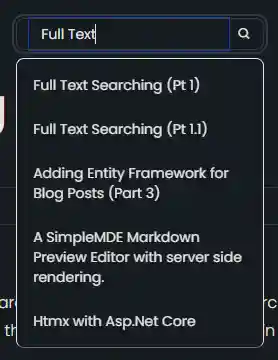
请注意::大象在会议室里是我不认为最好的方法。 为了支持多-语言超级复杂, @(I'd需要不同的栏目 每种语言)和I'd 需要处理断裂和其他特定语言的东西@. IMS K8m将暂时忽略这一点并只关注英语+.LAZ'll 在 OpenSearchMSC11中显示如何处理此问题
正在搜索文本
为了添加搜索能力,我不得不对搜索做一些修改 api.}我增加了使用 EF.Functions.WebSearchToTsQuery("english", processedQuery)
    private async Task<List<(string Title, string Slug)>> GetSearchResultForQuery(string query)
    {
        var processedQuery = query;
        var posts = await context.BlogPosts
            .Include(x => x.Categories)
            .Include(x => x.LanguageEntity)
            .Where(x =>
                // Search using the precomputed SearchVector
                (x.SearchVector.Matches(EF.Functions.WebSearchToTsQuery("english", processedQuery)) // Use precomputed SearchVector for title and content
                || x.Categories.Any(c =>
                    EF.Functions.ToTsVector("english", c.Name)
                        .Matches(EF.Functions.WebSearchToTsQuery("english", processedQuery)))) // Search in categories
                && x.LanguageEntity.Name == "en")// Filter by language

            .OrderByDescending(x =>
                // Rank based on the precomputed SearchVector
                x.SearchVector.Rank(EF.Functions.WebSearchToTsQuery("english", processedQuery))) // Use precomputed SearchVector for ranking
            .Select(x => new { x.Title, x.Slug,  })
            .Take(5)
            .ToListAsync();
        return posts.Select(x=> (x.Title, x.Slug)).ToList();
    }
当查询中有空格时此选项可选用@ ' @
    if (!query.Contains(" "))
        {
            posts = await GetSearchResultForComplete(query);
        }
        else
        {
            posts = await GetSearchResultForQuery(query);
        }
否则我使用现有的搜索方法来附加前缀字符@ . @
EF.Functions.ToTsQuery("english", query + ":*")
搜索控制
使用 阿尔卑斯山 我做了一个简单的部分控制, 它提供了一个超级简单搜索框@ . @
<div x-data="window.mostlylucid.typeahead()" class="relative"    x-on:click.outside="results = []">

    <label class="input input-sm dark:bg-custom-dark-bg bg-white input-bordered flex items-center gap-2">


        <input
            type="text"
            x-model="query"

            x-on:input.debounce.300ms="search"
            x-on:keydown.down.prevent="moveDown"
            x-on:keydown.up.prevent="moveUp"
            x-on:keydown.enter.prevent="selectHighlighted"
            placeholder="Search..."
            class="border-0 grow  input-sm text-black dark:text-white bg-transparent w-full"/>
        <i class="bx bx-search"></i>
    </label>
    <!-- Dropdown -->
    <ul x-show="results.length > 0"
        class="absolute z-10 my-2 w-full bg-white dark:bg-custom-dark-bg border border-1 text-black dark:text-white border-b-neutral-600 dark:border-gray-300   rounded-lg shadow-lg">
        <template x-for="(result, index) in results" :key="result.slug">
            <li
                x-on:click="selectResult(result)"
                :class="{
                    'dark:bg-blue-dark bg-blue-light': index === highlightedIndex,
                    'dark:hover:bg-blue-dark hover:bg-blue-light': true
                }"
                class="cursor-pointer text-sm p-2 m-2"
                x-text="result.title"
            ></li>
        </template>
    </ul>
</div>
它有一堆 CSS 类可以对暗模式或灯光模式进行正确校正@. @Alpine @._js 代码非常简单@MS K2}It'}%s a simple typeahead control 我们还有一个小代码可以处理 关闭搜索结果的不焦点
x-on:click.outside="results = []"
注意我们这里有一个跳跃器,以避免用请求来敲击服务器@. @%
联署材料会
这需要到我们的 JS 函数 @ ( 定义 src/js/main.js)
window.mostlylucid = window.mostlylucid || {};

window.mostlylucid.typeahead = function () {
    return {
        query: '',
        results: [],
        highlightedIndex: -1, // Tracks the currently highlighted index

        search() {
            if (this.query.length < 2) {
                this.results = [];
                this.highlightedIndex = -1;
                return;
            }

            fetch(`/api/search/${encodeURIComponent(this.query)}`)
                .then(response => response.json())
                .then(data => {
                    this.results = data;
                    this.highlightedIndex = -1; // Reset index on new search
                });
        },

        moveDown() {
            if (this.highlightedIndex < this.results.length - 1) {
                this.highlightedIndex++;
            }
        },

        moveUp() {
            if (this.highlightedIndex > 0) {
                this.highlightedIndex--;
            }
        },

        selectHighlighted() {
            if (this.highlightedIndex >= 0 && this.highlightedIndex < this.results.length) {
                this.selectResult(this.results[this.highlightedIndex]);
            }
        },

        selectResult(result) {
           window.location.href = result.url;
            this.results = []; // Clear the results
            this.highlightedIndex = -1; // Reset the highlighted index
        }
    }
}
正如你可以看到的,这是非常简单的“(” 。许多复杂因素是处理上下键来选择结果“MS K1”
担任此职位 SearchApi
当选中结果时, 我们浏览到结果的 URL @ . @
     search() {
            if (this.query.length < 2) {
                this.results = [];
                this.highlightedIndex = -1;
                return;
            }

            fetch(`/api/search/${encodeURIComponent(this.query)}`)
                .then(response => response.json())
                .then(data => {
                    this.results = data;
                    this.highlightedIndex = -1; // Reset index on new search
                });
        },
HTMX
我还更改了与 HTMX, 合作的接驳方式。 search 使用 HTMX 刷新的方法@ : @%
    selectResult(result) {
    htmx.ajax('get', result.url, {
        target: '#contentcontainer',  // The container to update
        swap: 'innerHTML', // Replace the content inside the target
    }).then(function() {
        history.pushState(null, '', result.url); // Push the new url to the history
    });

    this.results = []; // Clear the results
    this.highlightedIndex = -1; // Reset the highlighted index
    this.query = ''; // Clear the query
}
请注意,我们交换 contentcontainer 这是更新页面内容的简单方式, 没有页面刷新@ .}
我们还将历史的url 改成新的url.
在结论中的结论
这为网站添加了强大而简单的搜索能力, 帮助用户找到他们要找的东西。 它让这个网站更专业, 更容易浏览@. @