This is a viewer only at the moment see the article on how this works.
To update the preview hit Ctrl-Alt-R (or ⌘-Alt-R on Mac) or Enter to refresh. The Save icon lets you save the markdown file to disk
This is a preview from the server running through my markdig pipeline
Monday, 01 June 2026
此文章显示StyloBot'}分类结果如何在 RAzor.NET}:}标记辅助器中成为应用逻辑,

StyloBot 释放系列
- 行为@, @% 不是身份为何StyloBot以行为方式模拟客户?
- ASP=.@NET 用户界面@ : 服务器@ MS K1 在检测结果上方的表面
- 在LongM-Running .NET服务中查找和固定无约束增长使引擎在生产过程中无趣的可靠性纪律
- 檔案型態Script UI: Express, fastifyMS K2 和浏览器组件
- 侧车建筑@ : 检测引擎如何连接到非@ MS K1NET 堆栈
- 学习加快速度“:”适应性学习系统“, 4 -”记忆和裁决缓存
- 静坐不动的测试: 校验纪律 @: 一个 BDF 文件驱动回溯@,load @MS K3和校准
- StyloExptracte {-} 本地学习 HTML 到 标记下转换器: HTML→ Markdown 层与探测器对齐 MSSK2 行尸虫清晰识别捕捉了, 和狗食环让它诚实
StyloBot UI 是 ASP+.NET 表面在StyloBot's 检测结果@. 它的任务很简单: 让网络应用程序真正需要它的地方可以使用机体和风险分类
大多数的UX系统都是盲人 .}它们向每个人提供相同的页面 *,}然后尝试用中间软件
本文是StyloBot发布系列的第二个条目 @. 行为@, @% 不是身份 这个覆盖ASP=.NET表面, 该表层将该模型转化为应用行为@.
假设检测已经存在@. @Asssume当前请求已有分类结果附于该请求后 @.}有趣的问题是,当页面正在构建时您的 UI 能做什么? #.#
这就是StyloBot UI 用于 @. @ 它在检测结果上给 ASP@ .NET 一个干净的表面, 这样Razor 查看@,}控制器 @ MS K3}和页面管理者可以直接使用它\ .}
所以,不要在事实发生后纠缠摩擦。 “, ” 你可以在转换时间时塑造体验“: ”
此篇文章具体涉及 ASP.NET surruption:标签助手{,}page_-legal gate,與伺服器MS K5side connection}.以下 行为@, @% 不是身份下篇文章将覆盖 JavaScript 和客户端@- @side poverce_.}
这是在Stylobot.net 仪表板的右上角,

右上方是三个标签帮手 @(#<sb-badge>, <sb-confidence>, <sb-risk-pill>“)”读取来自同一角度的“-”请求检测结果,控制器将会在“.” 表示相同数据@,”
核心想法是简单的@:检测不应该停留在 @"allow"或#"block."。
意思是:
如果您想要已经覆盖的检测引擎故事@ , @ label 部分#2 和 部分#3. 此文章在检测到后, 开始于@:以上一层。 您如何向 ASP.NET?
flowchart LR
    A[Incoming request] --> B[StyloBot middleware]
    B --> C[Risk score bot type and signals]
    C --> D[Tag helpers in Razor]
    C --> E[Controller and page policy]
    D --> F[Different rendered experience]
    E --> G[Allow block challenge or redirect]
没有 UI 表面@, @% 检测被困在基础设施中 @ .#
您可以登录一个记分@ . @ 您也许可以屏蔽请求\ .} 但是您不能轻易地说\ MS K2
这就是为什么表面问题 . 它将探测转换成应用逻辑 .
有时正确的答案是块块. 通常它是一种微妙的东西
这是 StyloBot 的差别化器UI @ .} 检测引擎为您提供判断@ ;}ASP.NET表面让您在页面和流层做一些有用的事情。 该判决来自 @,}(该裁决来自何方) MS K6s缓存{,}为什么持续运行来自同一客户的请求需要花费微秒而不是毫秒=,} 学习加快速度.)
这篇文章通过一个样本 ASP.NET 核心 MVC 商店前端使用 StyloBot UI 帮助六页@:主页 @, 产品页面_, checkout}%, login}, 通讯签名@MS K6 和自定义T- 诊断学网页\□.
试样应用是有意小一点的 “:”生成产品“,” 一些分类“MS K2”检查“MSC3”通讯“,”和“login”. 点不是商业逻辑“MSSK6”
安装软件包@: @% 1
dotnet add package Mostlylucid.BotDetection
dotnet add package Mostlylucid.BotDetection.UI
然后把StyloBot的电线接进去 Program.cs:
builder.Services.AddStyloBot(
    configureDashboard: dashboard =>
    {
        dashboard.BasePath = "/_stylobot";
        dashboard.AllowUnauthenticatedAccess = true; // dev only
    },
    configureDetection: detection =>
    {
        detection.ExcludeLocalIpFromBroadcast = false;
    });

// ...

app.UseStyloBot();
app.MapHub<StyloBotDashboardHub>("/_stylobot/hub");
这足以开始对请求进行分类, 并让 Razor, 控制器 @ , @ 和实时仪表板@ MS K2} 了解结果。 如果您想要使用“ 光子” -minimim 集成故事 @ MPK4 @ “3”部分更详细地述及了这一点。.
登录页面是一个不错的微缩@-}示例,因为它在几行中显示了整个模型_.}{
flowchart TD
    A[Request for login page] --> B[Render page]
    B --> C[Bot sees warning]
    B --> D[Form is rendered]
    D --> E[Submission arrives]
    E --> F{Honeypot triggered?}
    F -->|Yes| G[Redirect to LoginDenied]
    F -->|No| H{IsBot?}
    H -->|Yes| G
    H -->|No| I[Authenticate user]
<!-- Layer 1: bots see a deterrent message before the form -->
<sb-bot>
    <div class="alert alert-warning">Automated login attempts are detected and blocked.</div>
</sb-bot>

<form method="post" action="/Account/Login">
    <!-- Layer 2: hidden trap fields - humans leave them blank; bots fill everything -->
    <sb-honeypot prefix="hp" fields="2"></sb-honeypot>

    <input type="email" name="email" />
    <input type="password" name="password" />
    <button type="submit">Sign In</button>
</form>
// Layer 3: server-side final check before any processing
if (HoneypotValidator.IsTriggered(HttpContext) || HttpContext.IsBot())
    return RedirectToAction("LoginDenied");
bot看到警告@,}如果它提出 @,},然后去旅行蜂蜜罐 如果它不知不觉地绕过先前的层....
这篇文章的其余部分扩展了这个想法,
主要商业问题不是抽象的"bots"。 不同的自动化造成不同种类的损坏*.
减价者=. 他们收割产品名称@,$price @,}描述,#和股票数据 以便竞争者能近实时对你们重新定价_.>
邮袋测试器@. @% 直到找到有效的代码 ,,然后被贴上优惠券论坛 并侵蚀边际
身份证明文件 他们重放泄露的用户名@- @password 配对,
AI培训爬行者 它们收获描述 ,审查 MS K1 和示范训练的编辑拷贝 这与退场攻击者不同 但仍然是提取
《通讯》收割者 @. 或注射缺陷测试”."
这些不是相同的问题 @,所以一个单块#-}所有的战略都是错误的抽象@. _BAR_行为=-#Avolution gateting 允许您相应响应 @MS K4}
主页是许多剪切器启动的地方 .}他们想要目录 <.> 200)}您希望人类可以使用的目录和可索引搜索的目录,}但对于自动收割来说商业价值不那么高 200)}.}
假想: 切价点击 /@; 它可以看到中性目录消息@,}没有欢迎副本 , 没有分类计数.}
<!-- Human visitors see the welcome message and category count -->
<sb-human>
    <p class="muted">Welcome! Browse @Model.Count products.</p>
</sb-human>

<!-- Bots see a neutral, non-committal message -->
<sb-bot fallback="hide">
    <p class="muted">Product catalogue.</p>
</sb-bot>

<!-- Search engine crawlers get structured metadata, not price data -->
<sb-gate bot-type="SearchEngine">
    <meta name="description" content="@Model.Count products across @categories categories." />
</sb-gate>

<!-- Verified bots (Googlebot etc.) see a specific indicator -->
<sb-gate bot-type="VerifiedBot">
    <div class="alert alert-info">Verified crawler detected. Serving crawl-optimised view.</div>
</sb-gate>

<!-- High-risk sessions see friction before the buy buttons -->
<sb-gate min-risk="High">
    <div class="alert alert-warning">Additional verification may be required at checkout.</div>
</sb-gate>
这些是提供提示@, @ not access control .}页面仍然有效 它周围的上下文是什么变化?
这里也是爬行者区分问题的地方 . 你确实想要谷歌机器人索引产品. 您可能不希望每个自动客户端 得到与人类飞人相同的商业演示文稿 *.}行为=-aver murder 让您将 @"indexable@"从“"valuable>."}分开
产品细节页面是商业意图变得明确的地方 .}它也是定价者和凭证猎人寻找 他们关心的信号的地方
假想 M: /Product/Detail/12@;@ it sees no skel code_,}没有折价代码=-#to\ -cart button@,,也没有购买信号来操作*
<!-- Exclusive discount - only shown to low-risk, verified human visitors -->
<sb-gate max-risk="Low">
    <div class="alert alert-success">
        Member discount: use code LOYAL10 for 10% off today.
    </div>
</sb-gate>

<!-- Medium-risk visitors get a friction signal before the cart button -->
<sb-gate min-risk="Medium">
    <div class="alert alert-warning">
        We noticed some unusual activity from your network.
        You can still purchase. You may be asked to verify at checkout.
    </div>
</sb-gate>

<!-- Datacenter/VPN visitors lose the buy button -->
<sb-signal signal="ip.is_datacenter" condition="true">
    <p class="muted">Purchase unavailable from datacenter or VPN networks.</p>
</sb-signal>

<!-- Human-only: the add-to-cart button -->
<sb-gate human-only>
    <form method="post" action="/Cart/Add">
        <button type="submit" class="btn btn-success">Add to Cart</button>
    </form>
</sb-gate>

<!-- Detection mini-card for transparency -->
<sb-summary variant="card"></sb-summary>
<sb-confidence display="bar" width="180px"></sb-confidence>
三个有用模式显示在此@. @%
以忠诚为攻击目标 提供好价钱应该到好的会场去 . 展示的折扣只给低端的- 风险交通减少浪费和降低拾荒者或代金券商取消报价的机会 MS K2
进步摩擦=. 中Q-风险不自动表示“"block."共享网络@,隐私浏览器 @,和VPNs”都产生虚假的阳性=%.}警告通常比硬性拒绝更能保存销售品_.
信号@- @ 级别 gateting_ . ip.is_datacenter 是一个原始信号@, @ not a risk group #.}有时你关心的政策不是#"#这个访客的风险有多大?
如果您想要那些信号背后的建筑 , “2”部分涵盖分阶段探测管道。.
这种区别贯穿于样本的其余部分: : 风险波段形成广泛的UX决定 , ,而单个信号则处理狭义的政策规则.
检出是网站最高的目标@-值 @.欺诈自动化_,卡测试},凭单滥用>,和脚本重写全部在此集合.
*假想@: @ a passer % 1} 测试机器人点击率 /Cart/Checkout@;_@ it sees a dead -\ end message\ I,}提供一份蜂蜜罐+-\ 填充的表格,\ 并获得一个沉默接受, 不重试奖励@.}
flowchart TD
    A[Visitor reaches checkout] --> B{Human?}
    B -->|No| C[Show dead-end message]
    B -->|Yes| D{Risk band}
    D -->|Low| E[Express checkout]
    D -->|Elevated| F[Standard payment flow]
    D -->|High or above| G[Alternative path]
    E --> H[POST order]
    F --> H
    G --> H
    H --> I{Honeypot triggered?}
    I -->|Yes| J[Silent accept fake success]
    I -->|No| K[Process real order]
<!-- Gate the entire checkout form on human-only detection -->
<sb-gate human-only>
    <form method="post" action="/Cart/Order">
        @Html.AntiForgeryToken()

        <!-- Honeypot trap fields - invisible to humans, irresistible to bots -->
        <sb-honeypot prefix="co" fields="2"></sb-honeypot>

        <!-- Express checkout only for trusted visitors -->
        <sb-gate max-risk="Low">
            <button type="submit" name="express" value="true" class="btn btn-success">
                Express Checkout
            </button>
        </sb-gate>

        <!-- Standard checkout available up to elevated risk -->
        <sb-gate max-risk="Elevated">
            <button type="submit" class="btn btn-primary">Proceed to Payment</button>
        </sb-gate>

        <!-- High-risk visitors get an alternative path -->
        <sb-gate min-risk="High">
            <p>Please call us to complete your order: 0800 123 456</p>
        </sb-gate>
    </form>
</sb-gate>

<!-- Bots see a dead end, not an error -->
<sb-bot>
    <p class="muted">Checkout is only available to human visitors.</p>
</sb-bot>
在控制器里 :
[HttpPost]
public IActionResult Order(OrderModel model)
{
    if (HoneypotValidator.IsTriggered(HttpContext))
    {
        // Silent accept - bot thinks the order succeeded
        return RedirectToAction("Confirmed");
    }

    return ProcessOrder(model);
}
此页面显示三种合作技巧 @. @%
蜜罐丢弃@. @% 如果一个机器人填充了隐藏字段@, @ 您静默地接受并放弃请求\ .}错误反馈帮助攻击者过激@ MS K2 静默浪费他们的时间@ I.}
风险 - 高级CTAS. Express check out is a trust because * ,* 不是默认的右键 . Sguidous 会话仍然可以购买,}但是通过一个较慢的路徑 <.> n通过一条较慢的道路\MSC3}
优雅的降解 . 简单信息在操作上往往胜过严重错误@. @Bots很少关心prose;}操作员和监控系统,
登录是另一种不同的高@ - @ value page MS K1} 目标不是垃圾车,而是账户访问@ I,。 它改变了交易@ MPK3_ offs @ .}
假想@: @ a credicial=% - statusing 脚本点击 /Account/Login{\fn黑体\fs22\bord1\shad0\3aHBE\4aH00\fscx67\fscy66\2cHFFFFFF\3cH808080}",}填满蜂蜜罐的表 LoginDenied.
<!-- High-risk sessions see friction before the form -->
<sb-gate min-risk="High">
    <div class="alert alert-danger">
        High-risk signals detected. Login attempts are logged and may be blocked.
    </div>
</sb-gate>

<!-- Bots see a deterrent message - but the form is still rendered below -->
<sb-bot>
    <div class="alert alert-warning">
        Automated login attempts are detected and blocked.
    </div>
</sb-bot>

<!-- Form is visible to everyone; the honeypot is the second layer -->
<form method="post" action="/Account/Login">
    @Html.AntiForgeryToken()
    <sb-honeypot prefix="hp" fields="2"></sb-honeypot>
    <div class="form-group">
        <label for="email">Email address</label>
        <input type="email" id="email" name="email" autocomplete="email" />
    </div>
    <div class="form-group">
        <label for="password">Password</label>
        <input type="password" id="password" name="password" autocomplete="current-password" />
    </div>
    <button type="submit" class="btn btn-primary">Sign In</button>
</form>
控制器提供最后检查@: @%
[HttpPost]
public IActionResult Login(LoginModel model)
{
    if (HoneypotValidator.IsTriggered(HttpContext))
        return RedirectToAction("LoginDenied");

    if (HttpContext.IsBot())
        return RedirectToAction("LoginDenied");

    return Authenticate(model);
}
关键点是成本不对称@. 校验时假正数会丢失销售品 @. 登录时虚正数通常需要重试}. 失誤的记号=- 攻击成本为帐户=MS K4 这意味着这个终点可以证明更严格执行的理由.
《通讯》注册处是AI爬行器处理变得特别有趣的地方 ,}因为正确的答案往往不是
GPTBot 点击率 /Newsletter/Subscribe“; ” 它看到一个数据“- 许可信息,而不是订阅 prod , 且其表格的提交方式被静悄悄地丢弃”\ .
AI爬行者并不试图购买产品或brute-_Force账户@.}他们想要收获文字.}他们通常对身份很诚实
<!-- Human pitch - only visible to real visitors -->
<sb-human>
    <p class="muted">
        Get exclusive deals and discount codes delivered to your inbox.
        Subscribe below. Unsubscribe any time.
    </p>
</sb-human>

<!-- AI crawlers get a licensing message, not a block -->
<sb-gate bot-type="AiBot">
    <div class="alert alert-info">
        This email subscription endpoint is for human readers.
        For data licensing enquiries please contact us directly.
    </div>
</sb-gate>

<!-- Other automated clients get a simpler message -->
<sb-bot>
    <sb-gate bot-type="AiBot" negate="true">
        <div class="alert alert-warning">
            Automated subscription attempts are discarded.
        </div>
    </sb-gate>
</sb-bot>

<!-- The form - visible to everyone, processed differently per visitor type -->
<div class="card">
    <form method="post" action="/Newsletter/Subscribe">
        @Html.AntiForgeryToken()
        <sb-honeypot prefix="nl" fields="3"></sb-honeypot>
        <div class="form-group">
            <label for="email">Your email address</label>
            <input type="email" id="email" name="email" autocomplete="email" />
        </div>
        <button type="submit" class="btn btn-success">Subscribe</button>
    </form>
</div>
在控制器里 :
[HttpPost]
public IActionResult Subscribe(string email)
{
    if (HoneypotValidator.IsTriggered(HttpContext) || HttpContext.IsBot())
    {
        // Silent accept: bot thinks it succeeded, no retry incentive
        return RedirectToAction("Thanks", new { real = false });
    }

    _mailingList.Subscribe(email);
    return RedirectToAction("Thanks", new { real = true });
}
缩略 Thanks 两种情况下的视图均可以是相同的@.}重要部分是自动客户端无法区分成功与静态丢弃@MS K1
这也是机器人类型最重要的地方 @. @% AiBot 不只是另一个敌对标签@. @ it is a classion 能触发商业反应的分类 @ : @ @ @ I"# this interference is for humans @ MPK3_ talk to us another way@ MS K4}
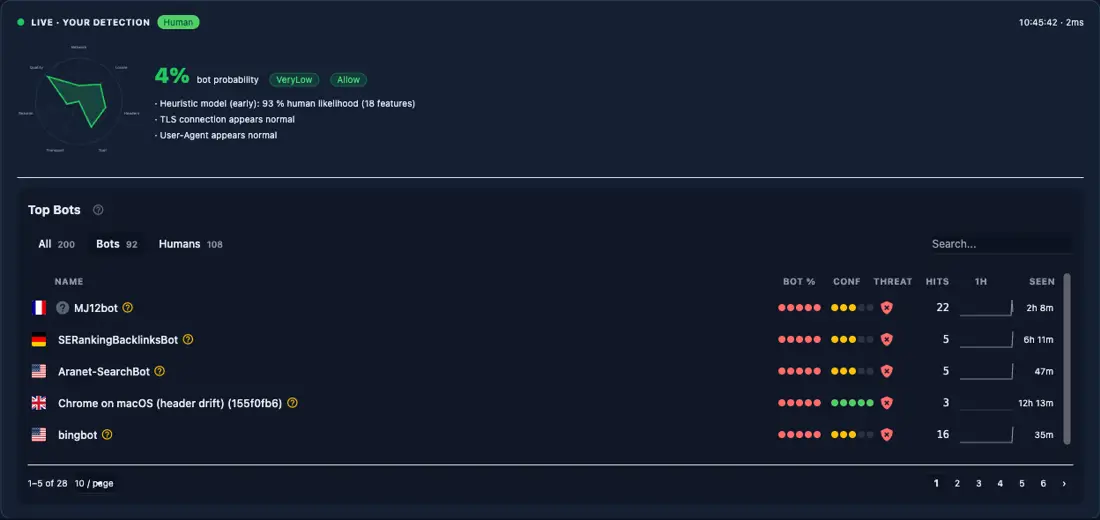
缩略 /Me 页面是开发者 @-#facing wirk page@.}它解答了实际整合问题: 什么是StyloBot认为这个请求是什么?
开发者刚刚部署StyloBot, 希望验证浏览器会话是否与人类一样得分。 curl 和 Bot. 等字
<!-- Full detection panel: confidence, risk, reasons, contributing detectors -->
<bot-detection-details collapsed="false"></bot-detection-details>

<!-- Individual components for custom layouts -->
<sb-badge variant="full"></sb-badge>
<sb-confidence display="both" width="100%"></sb-confidence>
<sb-risk-pill></sb-risk-pill>
<sb-summary variant="card"></sb-summary>
这: <bot-detection-details> 是在自己的主页 @.}Same subject* ,}相同的 Razor tag,}真实记录的流量=:}
透过 HttpContext API:
ViewBag.IsBot       = HttpContext.IsBot();
ViewBag.IsHuman     = HttpContext.IsHuman();
ViewBag.Probability = HttpContext.GetBotProbability();
ViewBag.RiskBand    = HttpContext.GetRiskBand();
ViewBag.BotType     = HttpContext.GetBotType();
ViewBag.BotName     = HttpContext.GetBotName();
ViewBag.Reasons     = HttpContext.GetDetectionReasons().ToList();
在开发过程中模拟不同的分类
# Simulate a search engine crawler
curl -H "ml-bot-test-mode: googlebot" http://localhost:5200/Me

# Simulate a high-risk scraper
curl -H "ml-bot-test-mode: scraper" http://localhost:5200/Me

# Real browser (Playwright, Chrome, etc.) scores as human
设置套设 EnableTestMode: true 内 appsettings.Development.json 如果你想要那些信头 荣耀吗?
StyloBot 用户界面特意小@. 原始是简单的 @; 组合的伸缩性来自_.
| 标签助手 @ | 角色@ | 关键属性 @MS K3 |
|---|---|---|
<sb-human> 仅供人类使用 fallback @ ("_ show"/" hide@ MS K2} 当未解密的 ;\ 默认@ MPK4Q 显示# )\ * @ I |
@ | |
<sb-bot> 仅针对机器人的 |
+Render fallback (=默认=:=隐藏=MS K2} @ |
=* |
<sb-gate> “ |
”多“-” 门关@ | }请见下面“MSC3” |
<sb-signal> 单黑板信号门 |
signal, condition, value, fallback, negate |
|
<sb-honeypot> @ |
# 隐形陷阱字段 @MS K1@ prefix, fields {\fn黑体\fs22\bord1\shad0\3aHBE\4aH00\fscx67\fscy66\2cHFFFFFF\3cH808080} |
|
<sb-badge> 探险状态芯片 variant @("#full@"/"_compact\ "/"}"){ |
# | |
<sb-confidence> |
Bot 概率栏 @ | display @("BARBAR "/"Text"/"}两者都#"), width |
<sb-risk-pill> 风险带标签 |
没有 | |
<sb-summary> -=YTET 翻译: variant ("#inline @"/"_卡通@")} |
{ | |
<bot-detection-details> 全面检测故障 |
collapsed (BOOL), view @("_default@"/"_contractiction\ ")} |
默认=MSK 1_compact\ msk2 |
<sb-gate> 是通用的- 目的工作马:
<sb-gate human-only>...</sb-gate>
<sb-gate bot-only>...</sb-gate>
<sb-gate verified-only>...</sb-gate>
<sb-gate max-risk="Low">...</sb-gate>
<sb-gate min-risk="Medium">...</sb-gate>
<sb-gate bot-type="SearchEngine,VerifiedBot">...</sb-gate>
<sb-gate bot-type="AiBot" negate="true">...</sb-gate>
<sb-gate max-risk="Low" fallback="hide">...</sb-gate>
风险波段按顺序排列 : VeryLow, Low, Elevated, Medium, High, VeryHigh, Critical.
<sb-signal> 直接在原始黑板信号上的大门 @._ condition 属性已接受 exists, not-exists, true, false, equals, not-equals, gt, lt, gte, lte, contains, any-true,和 all-true.
<sb-signal signal="ip.is_datacenter" condition="true">...</sb-signal>
<sb-signal signal="detection.probability" condition="gte" value="0.8">...</sb-signal>
设计上的重要选择是,这些帮手想让您的应用程序在UI中表达政策而不将所有不确定因素变为否定=.}
对于服务器来说, @-side sublication@,}(StyloBot) 也暴露了动作过滤器和页面属性@MS K2}* 如果 UI 层是 @"} *show something different {,"} 这层是#"do something 不同的_."}
[BlockBots] 返回 '% 403 bot-"\ 分类请求 , 有可选允许列表\ MS K3}
[BlockBots]                                                         // block everything
[BlockBots(AllowSearchEngines = true)]                              // let Googlebot through
[BlockBots(AllowSearchEngines = true, AllowSocialMediaBots = true)] // SEO + social previews
[BlockBots(BlockCountries = "CN,RU", BlockVpn = true)]              // geo + network enforcement
允许挂牌@ : @ AllowVerifiedBots, AllowSearchEngines, AllowSocialMediaBots, AllowMonitoringBots, AllowAiBots, AllowGoodBots, AllowScrapers, AllowMaliciousBots, AllowTools.
网络旗帜@: @% BlockCountries, AllowCountries, BlockVpn, BlockProxy, BlockDatacenter, BlockTor.
[RequireHuman] 更严格于 [BlockBots]@; 仅允许属于人类的申请通过#.
[AllowBots] 解除一个控制器的动作@- 关卡 [BlockBots].
[BlockBots]
public class AccountController : Controller
{
    public IActionResult Login() { }          // blocked

    [AllowBots]
    public IActionResult HealthCheck() { }    // passes through
}
[BotPolicy("name")] 应用一个名为“% ,” 的政策,该政策有可选的端点@ MS K1 @ 级别overs *.
[BotPolicy("strict")]
[BotPolicy("strict", BlockThreshold = 0.75, MinConfidence = 0.85, ActionPolicy = "throttle-stealth")]
[BotDetector("names")] 在没有定义完整策略的情况下, 运行特定的探测器内嵌@. @%
[BotDetector("UserAgent,Header,Ip", BlockThreshold = 0.8)]
[BotAction("name")] 在不更改检测策略的情况下, 跳过动作响应@. @%
[BotPolicy("default")]
[BotAction("challenge-captcha", FallbackAction = "block")]
public IActionResult Checkout() { }
[BlockIfSignal] 和 [RequireSignal] 个人黑板信号的大门
[BlockIfSignal("ip.is_datacenter")]
[RequireSignal("geo.country_code", Value = "GB")]
[SkipBotDetection] 完全用于健康检查和测量端点
所有分类数据都可直接在控制器@,Razor Pages @,和最小 APIS:中获取。
// Classification
bool isBot      = HttpContext.IsBot();
bool isHuman    = HttpContext.IsHuman();
bool isVerified = HttpContext.IsVerifiedBot();
bool isSearch   = HttpContext.IsSearchEngineBot();

// Scores
double prob       = HttpContext.GetBotProbability();   // 0.0 - 1.0
double conf       = HttpContext.GetBotConfidence();
RiskBand risk     = HttpContext.GetRiskBand();         // VeryLow ... Critical
ThreatBand threat = HttpContext.GetThreatBand();       // None ... Critical

// Bot identity
BotType? type = HttpContext.GetBotType();
string?  name = HttpContext.GetBotName();

// Network
bool isDc  = HttpContext.IsDatacenter();
bool isVpn = HttpContext.IsVpn();
string? cc = HttpContext.GetCountryCode();

// Raw signals (blackboard passthrough)
T? val = HttpContext.GetSignal<T>("ip.is_datacenter");

// Recommended action
bool allow   = HttpContext.ShouldAllowRequest();
bool block   = HttpContext.ShouldBlockRequest();
bool captcha = HttpContext.ShouldChallengeRequest();
在最小 API 端点@ : @
app.MapPost("/api/order", (HttpContext ctx, OrderModel order) =>
{
    if (ctx.IsBot() || ctx.GetRiskBand() >= RiskBand.High)
        return Results.Forbid();

    return Results.Ok(ProcessOrder(order));
});
标签辅助器和扩展方法从相同的per-请求检测结果@, 读取,所以没有第二次检测通过,因为用户界面消耗了它 @.
时的仪表板 /_stylobot 是实时操作视图@: @%
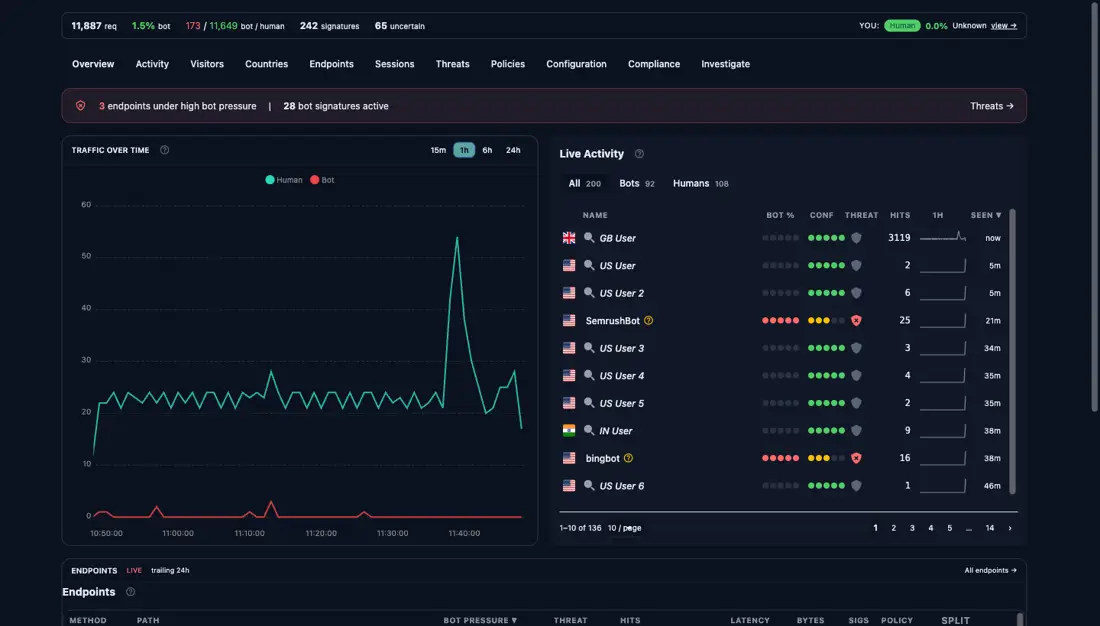
在实际操作中,拆开的条子特别有用 . 产品页面上的趋势很可能正在被刮去 ~. 登录或结关端点红时经常在用户抱怨之前很久就通过自动化测试=.
如果您想要这些指纹和行为矢量背后的下端“MSMK0”级模型, 行为@, @% 不是身份.
block /allow 是开关@ MS K1行为 @ -aware UX 是拨号@ MPK3}
将不确定性转换为疼痛@:假阳性,会失去客户和虚假的负差漏出值 @. 拨号可以让您对体验进行形状, 而不是 . 您可以隐藏 prove{,} 慢流}, 移除高Q-trust 快捷键@MS K6 呈现替代路径@, 并保留硬屏蔽以切换实际证明它有理的情况_.}
这是StyloBot UI 用于 @. 检测在请求的早期就可用, 然后您的应用程序决定这对页面@,、流,和结果#.意味着什么。
下一则发布序列中的“:” 在LongM-Running .NET服务中查找和固定无约束增长将StyloBot's矢量相似的层 从Q13GBLOH定时炸弹变成一些你可以在Pi上无限期运行的东西 檔案型態Script UI 在 Express\ ,} Fastified,}和客户端的浏览器@-}%side indiscription_.}使用相同的检测结果。

© 2026 Scott Galloway — Unlicense — All content and source code on this site is free to use, copy, modify, and sell.
