


我建造了Stylo Flow 是因为我不断写作 前后相同的模式且有时需要升级为更昂贵的分析 “.”现有工作流程引擎希望我从DAGs或国家机器的角度思考“.” 我想在信号中思考“.”
Ontó:StyloFlow 不是一个完成产品@;,因为我建造了清晰的RAG和 StyloBot I'm 添加缺失特性并擦亮关于双线闪光灯和短距闪光线的API . It{'}#, 但你可以尝试它并提供反馈. 我稍后会在这里更新“(信号辛克(signalSink)的东西,例如将改变为epheperal vMSSK8 改为“MS K9读只=')”
StyloFlow 是一个匹配的信号@- @% 驱动管弦库 我怎样想 约约 AI型输油管: 廉价操作首先升级为昂贵的操作, 只有在需要时才升级为贵的操作。
这是基础设施的供电 清晰RAG 区域包 - a cross\ @-}模式图 RAG 组合工具 DocSummamer 缩写器 @(documents), MSKO 数据合成器 ( 结构化数据 图像合成器 ( images) 进入一个统一的问号@-}以知识图解可视化的答覆系统 @.}它也具有权力 Stylolot 调制解码器 “(an professional bot protect system”) 并落实《公约》。 减少的RAG 模式@. @%
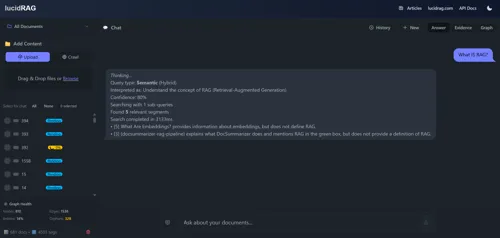
资料来源:: GitHub @-_Stylo佛罗
StyloFlow是信号“-”驱动管弦模型“MS K1”的工作原型。 API和形状将随着我建立清晰的RAG和StylobotMSKK0}而演化,但这里描述的执行语义和模式是作为第一位-级事实 ,*Calthacts *-}信任=MSK4驱动分支,}以及作为一个结构图案的升级_.
这是新建的 DSL 或工作流程语言@. @ it'}这是一套 执行的语义 今天,它运行在“-”处理中 与捆绑的货币=.}明天它将通过机器分配车道,同时将信号作为稳定的边界来保存.
这里的'}大多数工作流程引擎看起来都像 @:}
// ❌ Traditional: Hardcoded dependencies
public async Task ProcessDocumentAsync(string path)
{
    var text = await ExtractTextAsync(path);
    var chunks = await ChunkTextAsync(text);
    var embeddings = await GenerateEmbeddingsAsync(chunks);
    var entities = await ExtractEntitiesAsync(chunks);
    await StoreEverythingAsync(embeddings, entities);
}
此工作直到 @ : @ *
你最后要么是:
StyloFlow 以 多数是半卢曲. - @ a bounded,}可追踪的同步执行@.}库
快速重述短片提供的内容@: @
// Bounded concurrent processing with full visibility
var coordinator = new EphemeralWorkCoordinator<DocumentJob>(
    async (job, operation, ct) => {
        await ProcessAsync(job, ct);
        operation.Signal("document.processed");
    },
    new EphemeralOptions { MaxConcurrency = 4 });

// Enqueue work
await coordinator.EnqueueAsync(new DocumentJob(filePath));

// Full observability
Console.WriteLine($"Active: {coordinator.ActiveCount}");
Console.WriteLine($"Completed: {coordinator.TotalCompleted}");
时间轴的键值收益@: @%
详情请见 火和火.
此管弦模型以 @ :+# 扩展时间间隔
这里的'是关键的建筑轮廓 ~:
graph TD
    subgraph Traditional["❌ Traditional: Hardcoded"]
        T1[Component A] -->|calls| T2[Component B]
        T2 -->|calls| T3[Component C]
        T3 -->|calls| T4[Component D]
    end

    subgraph StyloFlow["✅ StyloFlow: Signal-Driven"]
        S1[Component A]
        S2[Component B]
        S3[Component C]
        S4[Component D]
        SS[Signal Sink]

        S1 -.emits.-> SS
        S2 -.emits.-> SS
        S3 -.emits.-> SS
        SS -.triggers.-> S2
        SS -.triggers.-> S3
        SS -.triggers.-> S4
    end

    style T1 stroke:#ff6b6b
    style T2 stroke:#ff6b6b
    style T3 stroke:#ff6b6b
    style T4 stroke:#ff6b6b
    style S1 stroke:#51cf66
    style S2 stroke:#51cf66
    style S3 stroke:#51cf66
    style S4 stroke:#51cf66
    style SS stroke:#339af0
它们发出信号,对信号作出反应 .
所发生事情的信号就是事实@ , @ 不是命令或事件@ MS K1 @ 它们 @ I' @ re immontiable\ ,} 时间戳已, @ 并带有信心评分 *.} 每个原子都有自己的信号
public record Signal
{
    public required string Key { get; init; }           // "document.chunked"
    public object? Value { get; init; }                 // Optional payload
    public double Confidence { get; init; } = 1.0;      // 0.0 to 1.0
    public required string Source { get; init; }        // Which component
    public DateTime Timestamp { get; init; }
    public Dictionary<string, object>? Metadata { get; init; }
}
关键建筑点:SignalSink是一个持续的历史观@.
信号ink 当一项行动将协调员逐出时,所有共享的协调员的所有操作都提供可查询的视图 . 信号在协调人整个生命周期中持续存在 =- 当一个行动将其协调员赶出去时 该信号一直留在水槽里直到手动清除@.
// Create a shared signal sink (no parameters, signals persist)
var sink = new SignalSink();

// Coordinators manage operation lifetime, NOT signal lifetime
var coordinator = new EphemeralWorkCoordinator<string>(
    ProcessAsync,
    new EphemeralOptions
    {
        MaxConcurrency = 8,
        MaxTrackedOperations = 100,         // Operations evict after this
        MaxOperationLifetime = TimeSpan.FromMinutes(5),  // Or after this time
        Signals = sink                      // Share the persistent view
    });

// Operations emit via their emitter
public async Task ProcessAsync(string docId, SignalEmitter emitter, CancellationToken ct)
{
    // Store actual data externally (cache, database, blob storage)
    await cache.SetAsync($"doc-{docId}", documentData);

    // Signal carries a REFERENCE, not the data
    emitter.Emit("document.chunked", key: docId); // Key references external data
}

// SignalSink is readonly - it cannot alter signals
// Signals persist until their operation evicts from the coordinator
信号ink 提供两种协调模式@: @
-=YTET -伊甸园字幕组=- 翻译:
// Subscribe to the sink for push notifications
sink.Subscribe(signal => {
    if (signal.Is("document.chunked"))
    {
        // React immediately - signal includes OperationId
        Console.WriteLine($"Op {signal.OperationId} chunked doc at {signal.Timestamp}");
    }
});

// Returns IDisposable for cleanup
using var subscription = sink.Subscribe(HandleSignal);
以(为基地
// Get all signals for a specific operation
var opSignals = sink.GetOpSignals(operationId);

// Detect if any operation has emitted a signal
if (sink.Detect("embeddings.generated"))
{
    // At least one operation has generated embeddings
}

// Sense all signals matching a condition
var recentErrors = sink.Sense(s =>
    s.Signal.StartsWith("error.") &&
    s.Timestamp > DateTimeOffset.UtcNow.AddMinutes(-5)
);

// Get operation summary from its signal history
var summary = sink.GetOp(operationId);
Console.WriteLine($"Operation ran for {summary?.Duration}");
为什么这重要?
关键设计原则@: @% 在缓存或数据库中存储大型数据@(documents @ ,}图像@ MS K2}矢量 @ MOSK3}{在快取夹或数据库里*. 信号只包含类似的参考文献 "cache://doc-123" 或操作键@. @%
实例协调@:
// Operation emits signal via ISignalEmitter interface
public async Task ProcessAsync(Item item, ISignalEmitter emitter, CancellationToken ct)
{
    // Emit to the sink
    emitter.Emit("processing.started");

    await DoWorkAsync(item, ct);

    emitter.Emit("processing.completed");
}

// Wave checks if it should run by querying sink
public bool ShouldRun(string path, AnalysisContext ctx)
{
    // Pull pattern: query the sink via context
    return ctx.Detect("document.chunked");
}

// UI subscribes to sink for reactive updates
sink.Subscribe(signal => {
    if (signal.Signal.StartsWith("document."))
    {
        // Push pattern: react immediately
        UpdateProgressUI(signal);
    }
});
在两个级别升级 :
// Pattern 1: Intra-coordinator escalation (wave checks signals)
public bool ShouldRun(string path, AnalysisContext ctx)
{
    var quality = ctx.GetSignal("quality.score");
    return quality?.Confidence < 0.7; // Only run if quality is low
}

// Pattern 2: Inter-coordinator escalation (atom routes to another coordinator)
// Option A: Explicit escalation signal
typed.Raise("escalate.to.expensive", payload, key: "doc-123");

// Option B: EscalatorAtom examines signals and decides
new EscalatorAtomOptions<T> {
    ShouldEscalate = evt => evt.Payload.Confidence < 0.7
}
多协调员独立运行@.EscalatorAtom 监视一位协调员的信号,
关于这个理论背后的理论 , 受限制的模糊环境拖拉.
关键关卡0 信号是协调事件 @,不是数据传输@.大数据 @MS K2documents,图像 @,嵌入{)应该住外部存储}#.
// ❌ BAD: Carrying data in signals (memory pressure, boxing)
var imageBytes = await ProcessImageAsync(input);
emitter.Emit("image.processed", metadata: new { Data = imageBytes });

// ✅ GOOD: Store externally, signal the reference
var imageBytes = await ProcessImageAsync(input);
var cacheKey = $"processed/{docId}";
await cache.SetAsync(cacheKey, imageBytes);
emitter.Emit("image.processed", key: cacheKey);

// Later: Retrieve when needed
if (sink.Detect("image.processed"))
{
    var signals = sink.GetOpSignals(operationId);
    var imageKey = signals.FirstOrDefault(s => s.Signal == "image.processed")?.Key;
    if (imageKey != null)
    {
        var bytes = await cache.GetAsync<byte[]>(imageKey);
    }
}
最佳做法
"cache://key", "blob://container/file", "db://table/id"声明合同 ( 是什么触发我 , 我付出了多少代价 与执行分离@. @% 此分隔存在, 这样您就可以理解工作流程而不读取code@ , @% 和更改执行命令而不重新拼写 @ MS K2} @
name: BotDetector
priority: 10              # Lower runs first
enabled: true

# What kind of component is this?
taxonomy:
  kind: analyzer          # sensor|analyzer|proposer|gatekeeper
  determinism: probabilistic
  persistence: ephemeral

# When should this run?
triggers:
  requires:
    - signal: http.request.received
      condition: exists

# What does it produce?
emits:
  on_complete:
    - key: bot.detected
      confidence_range: [0.0, 1.0]

  conditional:
    - key: bot.escalation.needed
      when: confidence < 0.7

# Resource limits
lane:
  name: fast              # fast|normal|slow|llm
  max_concurrency: 8

budget:
  max_duration: 100ms

# Configuration values
defaults:
  confidence:
    bot_detected: 0.6
  timing:
    timeout_ms: 100
福利:*
当您能够用手写 YAML 列表时 @ , @ StyloFlow 包含一个视觉工作流程构建器, 它允许您使用模块=-@ synth-}风格补丁_:}设计信号+-}驱动的工作流程
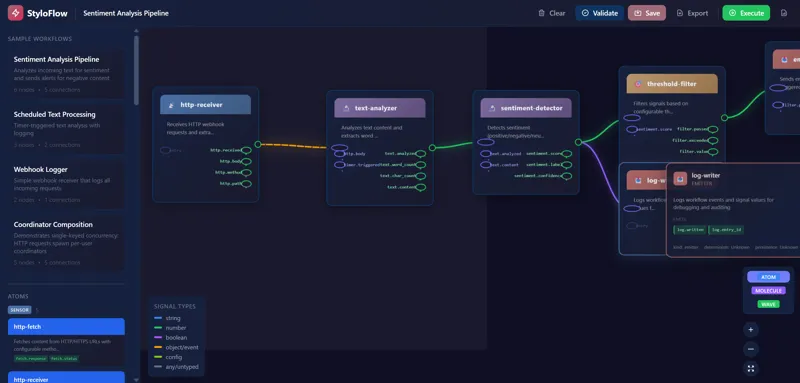
UI 提供#:
这样可以很容易地尝试不同的工作流程形状, 而不用手写 YAML ,, 同时仍然给予您对生成配置的完全控制@.}
一个波是一个可调制分析阶段@. @% 此接口已存在, 可以让 @ " @ {如果我们运行}?"} 成为第一个=- 类决定“,”不是一个在有条件逻辑中埋藏的执行细节“.”
public interface IContentAnalysisWave
{
    string Name { get; }
    int Priority { get; }               // Higher runs first
    bool Enabled { get; set; }

    // Quick filter - avoid expensive work
    bool ShouldRun(string contentPath, AnalysisContext context);

    // Do the analysis
    Task<IEnumerable<Signal>> AnalyzeAsync(
        string contentPath,
        AnalysisContext context,
        CancellationToken ct);
}
简单波示例@: @%
public class FileTypeWave : IContentAnalysisWave
{
    public string Name => "FileType";
    public int Priority => 100;
    public bool Enabled { get; set; } = true;

    public bool ShouldRun(string path, AnalysisContext ctx)
    {
        // Skip if we already know the type
        return ctx.GetSignal("file.type") == null;
    }

    public async Task<IEnumerable<Signal>> AnalyzeAsync(
        string path,
        AnalysisContext ctx,
        CancellationToken ct)
    {
        var extension = Path.GetExtension(path);
        var mimeType = GetMimeType(extension);

        return new[]
        {
            new Signal
            {
                Key = "file.type",
                Value = mimeType,
                Confidence = 1.0,
                Source = Name
            }
        };
    }
}
波浪协调+:
缩略 WaveCoordinator 优先排序的运行波:
var coordinator = new WaveCoordinator(waves, profile);
var context = new AnalysisContext();

var results = await coordinator.ExecuteAsync(filePath, context, ct);

// All signals from all waves
foreach (var signal in context.GetAllSignals())
{
    Console.WriteLine($"{signal.Key}: {signal.Value}");
}
通货币车道:
以不同货币货币限额运行的波道
| Lane @ | Q目的# | 货币=@ | |
|---|---|---|---|
fast |
+快速检查@QIP lookup @,}文件型態 @MS K3+# | + @%16+_ | { |
normal |
标准处理(PARSINGMS K2 )}{ | MSSK5 | |
io |
@I/O绑定@(}文件内容为#,}API调用: @)}{ | (32} @MS K7}* | |
llm 昂贵的LLM呼叫 |
2 |
这使得昂贵的业务无法阻挡廉价业务。
这里的'%s 完整图片@: @
graph TB
    subgraph Input["Input Layer"]
        REQ[HTTP Request]
        FILE[File Upload]
        JOB[Background Job]
    end

    subgraph Ephemeral["Ephemeral Layer"]
        COORD[Work Coordinator]
        OPS[Operations<br/>own signals]
        SINK[SignalSink<br/>read-only view]
    end

    subgraph StyloFlow["StyloFlow Layer"]
        MAN[Manifests]
        WAVE[Wave Coordinator]
        ATOMS[Atoms<br/>own signals]
    end

    subgraph Execution["Execution"]
        FAST[Fast Lane]
        NORM[Normal Lane]
        LLM[LLM Lane]
    end

    subgraph Output["Output"]
        RES[Results]
        ESCAL[Escalation]
        STORE[Persistence]
    end

    REQ --> COORD
    FILE --> COORD
    JOB --> COORD

    COORD --> OPS
    SINK -.queries.-> OPS

    WAVE -.reads.-> SINK
    MAN -.configures.-> WAVE
    WAVE --> ATOMS

    ATOMS --> FAST
    ATOMS --> NORM
    ATOMS --> LLM

    SINK -.queries.-> FAST
    SINK -.queries.-> NORM
    SINK -.queries.-> LLM

    SINK -.read for.-> RES
    SINK -.read for.-> ESCAL
    SINK -.read for.-> STORE

    style COORD stroke:#339af0
    style SINK stroke:#339af0
    style WAVE stroke:#51cf66
    style ATOMS stroke:#51cf66
{\fn黑体\fs22\bord1\shad0\3aHBE\4aH00\fscx67\fscy66\2cHFFFFFF\3cH808080}花儿
所有权模式#:* @/#atom 每一个操作都拥有自己的信号@.}SignalSink 提供所有操作中仅显示的读数@MS K2}%. 信号可以升级 *{(_copied>)}或者在被逐出时回声 <( preserve ),} 但是自有列表是外部无法变换的.}
当前执行模式@: @% 单一的-process,捆绑的货币=,}用LRU驱逐观察到的行动.
未来执行模式#: 在不同的主机中执行的原子=.} 信号仍然是稳定的边界线 @- ' @ re alre also recordable,_ 时间戳@ ,} 和自定义的-#\ consepted @ MS K5} 所有权模式是@'_ t change @ MPK7{
在 @ -} process complete appressation 验证语义semantich.}发行是为了缩放执行的基数 {, 不改变管弦模式@.}
让我们看看如何 更清晰 使用 StyloFlow @:+%
初步检测阶段
public class FileTypeDetectorWave : IContentAnalysisWave
{
    public int Priority => 100;  // Run first

    public async Task<IEnumerable<Signal>> AnalyzeAsync(...)
    {
        var extension = Path.GetExtension(path);

        return new[]
        {
            new Signal
            {
                Key = "file.extension",
                Value = extension,
                Source = "FileTypeDetector"
            }
        };
    }
}
阶段 @ 2: @ chunking @ I(} 由文件@ MS K2_ extension @ MPK3触发
// In manifest:
// triggers:
//   requires:
//     - signal: file.extension
//       condition: in
//       value: [".pdf", ".docx", ".md"]

public class ChunkingWave : ConfiguredComponentBase, IContentAnalysisWave
{
    public int Priority => 80;

    public async Task<IEnumerable<Signal>> AnalyzeAsync(...)
    {
        var chunks = await ChunkDocumentAsync(path);

        ctx.SetCached("chunks", chunks);  // Share with other waves

        return new[]
        {
            new Signal
            {
                Key = "document.chunked",
                Value = chunks.Count,
                Source = Name
            }
        };
    }
}
由文档“.”触发
public class EmbeddingWave : ConfiguredComponentBase, IContentAnalysisWave
{
    public int Priority => 60;

    public bool ShouldRun(string path, AnalysisContext ctx)
    {
        // Only run if chunking succeeded
        return ctx.GetSignal("document.chunked") != null;
    }

    public async Task<IEnumerable<Signal>> AnalyzeAsync(...)
    {
        var chunks = ctx.GetCached<List<Chunk>>("chunks");
        var embeddings = await GenerateEmbeddingsAsync(chunks);

        ctx.SetCached("embeddings", embeddings);

        return new[]
        {
            new Signal
            {
                Key = "embeddings.generated",
                Value = embeddings.Count,
                Source = Name
            }
        };
    }
}
4:實體采掘 (palllel 嵌入MS K2
public class EntityExtractionWave : ConfiguredComponentBase, IContentAnalysisWave
{
    public int Priority => 60;  // Same as embedding - runs in parallel

    public async Task<IEnumerable<Signal>> AnalyzeAsync(...)
    {
        var chunks = ctx.GetCached<List<Chunk>>("chunks");

        // Use deterministic IDF scoring, not LLM per chunk
        // (See Reduced RAG pattern)
        var entities = await ExtractEntitiesAsync(chunks);

        return new[]
        {
            new Signal
            {
                Key = "entities.extracted",
                Value = entities.Count,
                Confidence = CalculateConfidence(entities),
                Source = Name
            }
        };
    }
}
阶段 @5:质量检查
public class QualityCheckWave : ConfiguredComponentBase, IContentAnalysisWave
{
    public int Priority => 40;  // After embedding + entities

    public async Task<IEnumerable<Signal>> AnalyzeAsync(...)
    {
        var embeddingSignal = ctx.GetSignal("embeddings.generated");
        var entitySignal = ctx.GetSignal("entities.extracted");

        var embeddingCount = (int)embeddingSignal.Value;
        var entityConfidence = entitySignal.Confidence;

        var quality = CalculateQuality(embeddingCount, entityConfidence);

        var signals = new List<Signal>
        {
            new Signal
            {
                Key = "quality.score",
                Value = quality,
                Source = Name
            }
        };

        // Trigger escalation if quality is poor
        if (quality < GetParam<double>("quality_threshold", 0.7))
        {
            signals.Add(new Signal
            {
                Key = "escalation.needed",
                Value = "low_quality_document",
                Source = Name
            });
        }

        return signals;
    }
}
这种办法的好处
这是 减少的RAG 仅用于合成的 < . {
Stylolot 调制解码器 是一种先进的机器人探测系统,它使用StyloFlow来进行多@- 阶段威胁分析 @. 见“"Escalation”中完整的升级示例
@ 1:_ 范-_ 出去
一个信号触发了多波 :
graph LR
    S1[document.uploaded] --> W1[ChunkingWave]
    S1 --> W2[MetadataWave]
    S1 --> W3[LanguageDetectionWave]

    W1 -.signal.-> S2[document.chunked]
    W2 -.signal.-> S3[metadata.extracted]
    W3 -.signal.-> S4[language.detected]

    style S1 stroke:#339af0
    style S2 stroke:#339af0
    style S3 stroke:#339af0
    style S4 stroke:#339af0
    style W1 stroke:#51cf66
    style W2 stroke:#51cf66
    style W3 stroke:#51cf66
序列依附关系
波浪等待上一个信号@: @%
graph LR
    W1[ExtractWave] -.signal.-> S1[text.extracted]
    S1 --> W2[ChunkWave]
    W2 -.signal.-> S2[text.chunked]
    S2 --> W3[EmbedWave]
    W3 -.signal.-> S3[embeddings.generated]

    style S1 stroke:#339af0
    style S2 stroke:#339af0
    style S3 stroke:#339af0
    style W1 stroke:#51cf66
    style W2 stroke:#51cf66
    style W3 stroke:#51cf66
有条件的分支
基于信号运行的不同波浪@: @%
graph TD
    W1[DetectorWave] -.signal.-> S1{confidence}

    S1 -->|< 0.4| W2[RejectWave]
    S1 -->|0.4-0.7| W3[EscalateWave]
    S1 -->|> 0.7| W4[AcceptWave]

    W2 -.signal.-> S2[rejected]
    W3 -.signal.-> S3[escalated]
    W4 -.signal.-> S4[accepted]

    style S1 stroke:#ffd43b
    style S2 stroke:#ff6b6b
    style S3 stroke:#ff922b
    style S4 stroke:#51cf66
    style W1 stroke:#339af0
    style W2 stroke:#ff6b6b
    style W3 stroke:#ff922b
    style W4 stroke:#51cf66
集成模式
多信号触发一波 :
graph LR
    W1[Wave A] -.signal.-> S1[a.complete]
    W2[Wave B] -.signal.-> S2[b.complete]
    W3[Wave C] -.signal.-> S3[c.complete]

    S1 --> T{All Ready?}
    S2 --> T
    S3 --> T

    T -->|Yes| W4[AggregatorWave]
    W4 -.signal.-> S4[aggregation.complete]

    style S1 stroke:#339af0
    style S2 stroke:#339af0
    style S3 stroke:#339af0
    style S4 stroke:#51cf66
    style T stroke:#ffd43b
    style W4 stroke:#51cf66
StyloFlow支持两个层面的升级+:
如果质量为 @<0.7,}#EscatorAtom} 将文件引向昂贵的LLM精炼协调器@.}_这避免了高价LLAM呼唤高价-′Q质提取>=.,从而节省了成本
这不是快速的“-”启动指南@; @ it'}这是展示模型如何搭配最小的例子_.}
安装@: @%
dotnet add package StyloFlow.Complete
概念切入点:
// 1. Define a wave
public class MyAnalysisWave : IContentAnalysisWave
{
    public string Name => "MyAnalysis";
    public int Priority => 50;
    public bool Enabled { get; set; } = true;

    public bool ShouldRun(string path, AnalysisContext ctx) => true;

    public async Task<IEnumerable<Signal>> AnalyzeAsync(
        string path,
        AnalysisContext ctx,
        CancellationToken ct)
    {
        // Your analysis logic here
        var result = await AnalyzeAsync(path);

        return new[]
        {
            new Signal
            {
                Key = "my.signal",
                Value = result,
                Confidence = 1.0,
                Source = Name
            }
        };
    }
}

// 2. Register waves
var waves = new List<IContentAnalysisWave>
{
    new MyAnalysisWave(),
    new AnotherWave(),
};

// 3. Create coordinator
var coordinator = new WaveCoordinator(
    waves,
    CoordinatorProfile.Default);

// 4. Execute
var context = new AnalysisContext();
var results = await coordinator.ExecuteAsync(filePath, context);

// 5. Read signals
foreach (var signal in context.GetAllSignals())
{
    Console.WriteLine($"{signal.Key}: {signal.Value} ({signal.Confidence})");
}
上面写着:
// Load manifests from directory
var loader = new FileSystemManifestLoader("./manifests");
var manifests = await loader.LoadAllAsync();

// Build waves from manifests
var waves = manifests
    .Where(m => m.Enabled)
    .OrderBy(m => m.Priority)
    .Select(m => WaveFactory.Create(m))
    .ToList();

var coordinator = new WaveCoordinator(waves, profile);
完整的示例“,”见 StyloFlow GitHub 库.
StyloFlow'}关键功能之一是 工作流程可发现性 {\fn黑体\fs22\bord1\shad0\3aHBE\4aH00\fscx67\fscy66\2cHFFFFFF\3cH808080}没有密码需要潜水吗?
这里“ ' ” 是清晰的列表目录结构@ : @ action
manifests/
├── 01-file-type-detector.yaml
├── 02-chunking.yaml
├── 03-embedding.yaml
├── 04-entity-extraction.yaml
├── 05-quality-check.yaml
└── 06-escalation.yaml
@ 01-_ file@ -} 类型 @ type _ MS K2} 执行员 @ MPK3$ yaml:}
name: FileTypeDetector
priority: 100
enabled: true
description: Detects file type from extension

taxonomy:
  kind: sensor
  determinism: deterministic
  persistence: ephemeral

triggers:
  requires:
    - signal: document.uploaded
      condition: exists

emits:
  on_start:
    - file.detection.started
  on_complete:
    - key: file.extension
      type: string
      confidence_range: [1.0, 1.0]
    - key: file.mime_type
      type: string
      confidence_range: [1.0, 1.0]

lane:
  name: fast
  max_concurrency: 16

budget:
  max_duration: 10ms
02-chunking.:#
name: ChunkingWave
priority: 80
enabled: true
description: Splits documents into semantic chunks

taxonomy:
  kind: extractor
  determinism: deterministic
  persistence: ephemeral

input:
  accepts:
    - document.pdf
    - document.docx
    - document.markdown
  required_signals:
    - file.extension

triggers:
  requires:
    - signal: file.extension
      condition: in
      value: [".pdf", ".docx", ".md", ".txt"]

emits:
  on_complete:
    - key: document.chunked
      type: integer
      confidence_range: [1.0, 1.0]
    - key: chunks.cached
      type: boolean

lane:
  name: normal
  max_concurrency: 8

budget:
  max_duration: 30s

defaults:
  chunking:
    max_chunk_size: 512
    overlap: 50
    respect_boundaries: true
03- MS K1 yaml}:
name: EmbeddingWave
priority: 60
ires:
    - signal: file.extension
      condition: in
      value: [".pdf", ".docx", ".md", ".txt"]

emits:
  on_complete:
    - key: document.chunked
      type: integer
      confidence_range: [1.0, 1.0]
    - key: chunks.cached
      type: boolean

lane:
  name: normal
  max_concurrency: 8

budget:
  max_duration: 30s

defaults:
  chunking:
    max_chunk_size: 512
    overlap: 50
    respect_boundaries: true
03- MS K1 yaml}:
name: EmbeddingWave
priority: 60
enabled: true
description: Generates ONNX embeddings for chunks

taxonomy:
  kind: embedder
  determinism: deterministic
  persistence: cached

input:
  required_signals:
    - document.chunked
    - chunks.cached

triggers:
  requires:
    - signal: document.chunked
      condition: ">"
      value: 0

emits:
  on_complete:
    - key: embeddings.generated
      type: integer
      confidence_range: [1.0, 1.0]

lane:
  name: normal
  max_concurrency: 4

budget:
  max_duration: 2m
  max_cost: 0.0  # Local ONNX model

defaults:
  embedding:
    model: all-MiniLM-L6-v2
    batch_size: 32
04-=实体=MSK1=Exterraction=MS K2=Yaml=MSC3}-
name: EntityExtractionWave
priority: 60  # Same as embedding - runs in parallel
enabled: true
description: Extracts entities using IDF scoring

taxonomy:
  kind: extractor
  determinism: deterministic
  persistence: persisted

input:
  required_signals:
    - document.chunked

triggers:
  requires:
    - signal: document.chunked
      condition: ">"
      value: 0

emits:
  on_complete:
    - key: entities.extracted
      type: integer
      confidence_range: [0.0, 1.0]  # Confidence varies

lane:
  name: normal
  max_concurrency: 8

budget:
  max_duration: 1m

defaults:
  entity:
    min_idf_score: 2.5
    min_frequency: 2
    max_entities: 100
@05-QQQ 质量@-# check_.}(YAML):
name: QualityCheckWave
priority: 40
enabled: true
description: Validates extraction quality

taxonomy:
  kind: gatekeeper
  determinism: deterministic
  persistence: ephemeral

input:
  required_signals:
    - embeddings.generated
    - entities.extracted

triggers:
  requires:
    - signal: embeddings.generated
      condition: ">"
      value: 0
    - signal: entities.extracted
      condition: exists

emits:
  on_complete:
    - key: quality.score
      type: double
      confidence_range: [0.0, 1.0]

  conditional:
    - key: escalation.needed
      when: quality.score < 0.7

lane:
  name: fast
  max_concurrency: 16

defaults:
  quality:
    min_embeddings: 5
    min_entity_confidence: 0.5
    threshold: 0.7
-=YTET -伊甸园字幕组=- 翻译:
name: EscalationWave
priority: 20
enabled: true
description: Improves low-quality extractions using LLM

taxonomy:
  kind: proposer
  determinism: probabilistic
  persistence: persisted

input:
  required_signals:
    - escalation.needed

triggers:
  requires:
    - signal: escalation.needed
      condition: exists
  skip_when:
    - signal: budget.exhausted

emits:
  on_complete:
    - key: escalation.complete
      type: boolean
    - key: entities.improved
      type: integer
      confidence_range: [0.7, 1.0]

lane:
  name: llm
  max_concurrency: 2  # Expensive

budget:
  max_duration: 30s
  max_tokens: 4000
  max_cost: 0.05

defaults:
  llm:
    model: gpt-4o-mini
    temperature: 0.1
    prompt_template: entity_extraction
阅读这些文件@,你立刻知道 @:
没有要求读取代码@ . @% 工作流程是自定义的 -/document_._
虽然上述例子充分显示了宣示性的YAML,波浪也可能是 代码@- @% 以原子为基础的原子 列表中的引用@: @%
name: CustomAnalyzer
priority: 50
enabled: true
description: Custom analysis logic

# Reference a code-based atom implementation
implementation:
  assembly: MyProject.Analyzers
  type: MyProject.Analyzers.CustomAnalyzerWave
  method: AnalyzeAsync

# The manifest still declares the contract
taxonomy:
  kind: analyzer
  determinism: probabilistic

triggers:
  requires:
    - signal: data.ready

emits:
  on_complete:
    - key: analysis.complete
      confidence_range: [0.0, 1.0]

lane:
  name: normal
  max_concurrency: 4

# Configuration values passed to the atom
defaults:
  threshold: 0.75
  max_iterations: 10
C# 实施MS K1
public class CustomAnalyzerWave : ConfiguredComponentBase, IContentAnalysisWave
{
    public async Task<IEnumerable<Signal>> AnalyzeAsync(
        string path,
        AnalysisContext ctx,
        CancellationToken ct)
    {
        // Access manifest config
        var threshold = GetParam<double>("threshold", 0.75);
        var maxIterations = GetParam<int>("max_iterations", 10);

        // Custom logic here
        var result = await PerformComplexAnalysis(path, threshold, maxIterations);

        return new[]
        {
            new Signal
            {
                Key = "analysis.complete",
                Value = result.Score,
                Confidence = result.Confidence,
                Source = Name
            }
        };
    }
}
福利:*
这种混合方法为您提供了宣示性工作流程发现,同时在可维持的 C#. 中保持复杂的逻辑
显示器结构使得生成可视化小于@: @%
graph TD
    DOC[document.uploaded] --> FT[FileTypeDetector<br/>Priority: 100<br/>Lane: fast]
    FT --> EXT[file.extension]

    EXT --> CH[ChunkingWave<br/>Priority: 80<br/>Lane: normal]
    CH --> CHUNKED[document.chunked]

    CHUNKED --> EMB[EmbeddingWave<br/>Priority: 60<br/>Lane: normal]
    CHUNKED --> ENT[EntityExtractionWave<br/>Priority: 60<br/>Lane: normal]

    EMB --> EMBGEN[embeddings.generated]
    ENT --> ENTEX[entities.extracted]

    EMBGEN --> QC[QualityCheckWave<br/>Priority: 40<br/>Lane: fast]
    ENTEX --> QC

    QC --> QSCORE[quality.score]
    QC -.conditional.-> ESC_NEED[escalation.needed]

    ESC_NEED -.-> ESC[EscalationWave<br/>Priority: 20<br/>Lane: llm]
    ESC --> ESC_DONE[escalation.complete]

    style DOC stroke:#339af0
    style FT stroke:#51cf66
    style CH stroke:#51cf66
    style EMB stroke:#51cf66
    style ENT stroke:#51cf66
    style QC stroke:#ffd43b
    style ESC stroke:#ff922b
此图表是用 YAML 列表程序生成的 {-} 没有手动绘图}.
StyloFlow的一个意想不到的属性是,它创建了一个系统 LLMs可以安全地解释.
大部分试图使用LLMs进行调试或操控失败的尝试, 因为它们所丢弃的系统不透明@:}
StyloFlow 做的正好相反 它暴露了 明确,-不可改变的事实 关于发生什么的 , 当", 和以什么样的自信.
这使得代码LLMS真正有用 @—不是作为演员@,,而是作为 分析员.
在StyloFlow, 中,LLM从不做:
而非, 它被给 信号ink视图 问问题如:
代码 LLM:}示例输入
{
  "operation": "doc-123",
  "signals": [
    { "key": "document.chunked", "value": 12, "confidence": 1.0, "source": "ChunkingWave" },
    { "key": "entities.extracted", "value": 4, "confidence": 0.42, "source": "EntityWave" },
    { "key": "quality.score", "value": 0.39, "source": "QualityCheckWave" },
    { "key": "escalation.needed", "source": "QualityCheckWave" }
  ]
}
'+%s 不是对数流@.+BARBAR'}a 推力基底.
代码LLM现在可以 MSSK0
全部没有被信任 do 做 万事如意
传统 @"#LLLM 调试@"}试图重播世界
@"_这里#'}代码和一些logs@,}出错的原因
StyloFlow 调试比较简单@: @
这是观察到的系统的确切状况 ."
因为信号是不可改变和拥有的 , 您不需要重新运行- 任何您需要重塑意旨吗?
法学硕士认为你已经相信事实的原因... ....
这只因为严格的边界而有效 :
没有反馈循环, 下一步的LLM @ "_ decides"}在大多数情况下, 它提议解释或配置建议: 人类的“ MS K4” 或者确定性政策@)以后可以应用.
这种不对称是蓄意的
一旦信号",\ 信任\ , 和结果被明确"MS K2"你 能够 后来的:
这些都不需要让LLM来操作这个系统 .
法学硕士成为 诊断透镜*,* 不是一个控制表面 .
StyloFlow doesn't it just make robbiotics systems safe . 它只是让概率系统安全
造就了他们 可辨识 @— to humans,}测试#,}和不交出控制器的 —}LLMs
{\fn黑体\fs22\bord1\shad0\3aHBE\4aH00\fscx67\fscy66\2cHFFFFFF\3cH808080}那:的区别
只有其中的一个比例 .
1. - 声明构成
系统显示执行命令=.}这是'的特性@-}它='}当您首先发出信号时会发生什么?
2. 默认可观察
每个动作都是信号@. @% 您没有 @ ' @ t添加可观察性 @ I- @ it' @ 内含@ MS K4 @ 完整执行跟踪 @ MPK5 @ 信任追踪# ,} 升级路径 @ MASK7 @ 预算消耗自然会下降 @. @
3. 适应性执行
信任分数驱动在没有明确路线逻辑的情况下进行分解@. 跳过昂贵的阶段, 当不必要的 @,}当不确定=,早于高端+- 不信任失败时中断. 控制流来自信号模式_.
*** 4.无模拟框架的可测试性**
Mock 信号 @,}不是组件@:
var context = new AnalysisContext();
context.AddSignal(new Signal
{
    Key = "document.chunked",
    Value = 10,
    Confidence = 1.0,
    Source = "Test"
});

var wave = new EmbeddingWave();
var results = await wave.AnalyzeAsync(path, context, ct);

Assert.Single(results);
Assert.Equal("embeddings.generated", results.First().Key);
递增复杂性
开始简单@ : @%
var coordinator = new EphemeralWorkCoordinator<Job>(ProcessAsync);
需要时添加信号@: @%
new EphemeralOptions { Signals = signalSink }
为多@ - @ 阶段 @ MS K1添加波
var waveCoordinator = new WaveCoordinator(waves, profile);
为声明配置添加列表@ : @
name: MyWave
triggers: [...]
emits: [...]
这里='}%s the full 更清晰 请参看上文“" useing case @:”中的详细代码示例。
document.uploaded 信号讯号file.extension 信号讯号text.extracted 信号讯号document.chunked 信号讯号embeddings.generated 信号讯号entities.extracted 信号讯号quality.score 信号讯号escalation.complete 信号讯号storage.complete 信号讯号用户界面订阅 SignalSink 作为 real @-}时间进度更新 *\ ( push 模式=):}
// Subscribe to sink for push notifications
signalSink.Subscribe(signal => {
    if (signal.Key.StartsWith("document."))
    {
        await _hub.Clients.User(userId)
            .SendAsync("DocumentProgress", new
            {
                stage = signal.Key,
                progress = CalculateProgress(signal),
                operationId = signal.OperationId
            });
    }
});
或使用拉动模式, 如果您更喜欢投票@: @%
// Query SignalSink for document progress (pull pattern)
var documentSignals = signalSink.GetSignals()
    .Where(s => s.Key.StartsWith("document.") &&
                s.Timestamp > lastCheck);

foreach (var signal in documentSignals)
{
    UpdateProgressUI(signal);
}
关键点@: 您订阅 SINK {(}, 它查看所有原子} ),} 不浏览单个操作}. Atoms 拥有信号 <;} 水槽提供推力 *(}
就是这样 更清晰 通过统一的信号\ -}驱动的管道{-}合并 DocSummamer 缩写器, 数据合成器,和 图像合成器 在一个交响层下 @. @%
这里='}%s the full Stylolot 调制解码器 仔细看管线 ( 参见“"Escalation:从快到索罗MS K3}详细代码
bot.detected 带有信任的信号bot.detected 信号讯号bot.detected 信号讯号基于信任的升级 关键好处是
// ❌ Traditional: Every request gets expensive analysis
var reputation = await CheckIpAsync(ip);
var behavior = await AnalyzeBehaviorAsync(session);  // Even if IP is known bad
var llmScore = await LlmAnalysisAsync(conversation);  // Always expensive

// ✅ StyloFlow: Waves run based on confidence signals
// BehaviorAnalysis only runs if confidence is ambiguous (0.4-0.7)
// LLM analysis only runs if still unsure after behavior check
成本细目=: IP check cost {$0} 并运行 100%}(时间轴) <.> _B行为分析 30%}\ @模棱两可的个案♪LLM 分析 {5%} #} still dreabledMSKK8}每份申请总成本: $0.0001 {\fn黑体\fs22\bord1\shad0\3aHBE\4aH00\fscx67\fscy66\2cHFFFFFF\3cH808080}所有的一切 $0.002 (20*x储蓄 ).#
| 地貌 @ | @StyloFlow@ | _Timoral @MS K3}空气流 @ | 步步函数 @MSKO5# | ||
|---|---|---|---|---|---|
| 协调协调协调 | +Signal@-+ | +RPCMPK3}基地在 @ | +DAG=-+基于# | +国家机器 | |
| 声明 | MS K1 YAML 标本 | NSK3 代码 MSKO4 先是 | ✅ DAGs | TMK8 JSONMSQK9YAMLMSC10 | |
| 有条件 | =✅ 分机: | ✅ 选择状态: @ | |||
| 升级 ❌手册 《 | 》《❌》 | ||||
| 可观察性 | Q 任务日志 @ | Q#✅执行历史 @MS K8 | |||
| 预算控制 | _❌_手册 @ | _QMK8_手册# | |||
| 当地执行 @ | @ @ ✅ @ in-_ process @ MPK3} @ I❌# 需要群組@ | @ @ *❌# 要求群組 @ MCK7 @ @ _❌# AWS only @MS K9# | |||
| 汇合货币车道 | +#✅QFast @/+Normal}/+LLM # | +@❌}《手冊》 《 | 》 *✅+Pools < | +❌}服务限量* | { |
此型号适合自然的位置 @ : @ @
{\fn黑体\fs22\bord1\shad0\3aHBE\4aH00\fscx67\fscy66\2cHFFFFFF\3cH808080}在哪里?
这些是模型的自然延伸 , 而不是对具体执行的承诺
随着语义通过清晰的RAG和Stylobot开发稳定下来,这些模式变得可行
从信号中学习
轨迹的升级路径效果最佳@: @%
// Did the LLM escalation improve accuracy?
// Learn to skip it if behavioral analysis is sufficient
成本优化
根据历史性能自动分配车道
// If a "slow" wave completes quickly, promote to "normal"
3. 信号重放
通过重放信号序列来调试@ : @
var replay = SignalReplay.FromFile("trace.jsonl");
await coordinator.ReplayAsync(replay);
4. 多-机械协调
将车道分布在机器上,同时保持信号中央控制@.
核心的洞察力就是这个 每个组件都有自信.
传统工作流程假设成功 /failure.AI工作流程需要:
提供此自然信号的信号@: @%
// Multiple detectors vote
var signals = context.GetSignals("bot.detected");

// Aggregate by confidence
var verdict = signals
    .OrderByDescending(s => s.Confidence)
    .First();

// Or majority vote
var isBot = signals
    .Count(s => (bool)s.Value) > signals.Count() / 2;

// Or weighted average
var score = signals
    .Sum(s => (bool)s.Value ? s.Confidence : -s.Confidence)
    / signals.Count();
这就是为什么StyloFlow工作得很好 减少的RAG “- ”每个提取阶段都产生一个信任分数“, ”和合成,只有当信心足够高时才会发生。”
执行模型:
为何信号重要?
工作执行
相关文章 @:
源代码@: @% GitHub @-_Stylo佛罗
传统工作流程引擎要求您申报 下一步会发生什么._BAR_此模式要求声明组件 他们所生产的果实, 和 他们需要什么然后让信号协调执行 .
键性移动@: @% 1 信任指南 , 保护车道.
这是关于选择时空或空气流的StyloFlow@-}那些解决不同问题的 & (dorable exput {,#,}工作流程版本 ~MSK
如果您正在建造 AI/+ML输油管,
这些行刑语义也许适合你的想法
缩略 缩短库图书馆 是稳定的基数.StyloFlow,加上上方的信号MS K1驱动管弦层. 两者都在通过在清晰RAG和Stylobot}.中的实际使用而演化
问题或反馈@,见 GitHub 库.

© 2026 Scott Galloway — Unlicense — All content and source code on this site is free to use, copy, modify, and sell.
